Showing posts with label ANCOVA. Show all posts

Friday, 21 July 2017

Power analysis and sample size calculation for Agriculture

Power analysis is extremely important in statistics since it allows us to calculate how many chances we have of obtaining realistic results. Sometimes researchers tend to underestimate this aspect and they are just interested in obtaining significant p-values. The problem with this is that a significance level of 0.05 does not necessarily mean that what you are observing is real.
In the book "Statistics Done Wrong" by Alex Reinhart (which you can read for free here: https://www.statisticsdonewrong.com/) this problem is discussed with an example where we can clearly see that a significance of 0.05 does not mean that we have 5% chances of getting it wrong, but actually we have closer to 30% chances of obtaining unrealistic results. This is because there are two types of errors in which we can incur (for example when performing an ANOVA), the type I (i.e. rejecting a null hypothesis when it is actually true) and type II (i.e. accepting a null hypothesis when it is actually false).
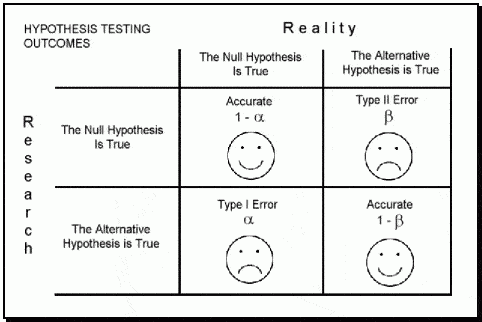
Image taken from: https://datasciencedojo.com/

The probability of incurring in a type I error is indicated by α (or significance level) and usually takes a value of 5%; this means that we are happy to consider a scenario where we have 5% chances of rejecting the null hypothesis when it is actually true. If we are not happy with this, we can further decrease this probability by decreasing the value of α (for example to 1%). On the contrary the probability of incurring in a type II error is expressed by β, which usually takes a value of 20% (meaning a power of 80%). This means we are happy to work assuming that we have a 20% chance of accepting the null hypothesis when it is actually false.
If our experiment is not designed properly we cannot be sure whether we actually incurred in one of these two errors. In other words, if we run a bad experiment and we obtain a insignificant p-value it may be that we incurred in a type II error, meaning that in reality our treatment works but its effect cannot be detected by our experiment. However, it may also be that we obtained a significant p-value but we incurred in a type I error, and if we repeat the experiment we will find different results.
The only way we can be sure to run a good experiment is by running a power analysis. By definition power is the probability of obtaining statistical significance (not necessarily a small p-value, but at least a realistic outcome). Power analysis can be used before an experiment to test whether our design has good chances of succeeding (a priori) or after to test whether the results we obtained were realistic.


Update 17/11/2017
How many subjects to compute a robust mean?

This is a question that I get sometimes when talking with students that are planning descriptive experiments. How many subjects do I need for the mean value I compute to be robust?

The answer is provided by Berkowitz here: www.columbia.edu/~mvp19/RMC/M6/M6.doc

The simplified formula to compute the minimum number of samples is:


where SD is the standard deviation and SE is the standard error. These values can be obtained from previous experiments, or from the literature. 

Effect Size

A simple and effective definition of effect size is provided in the book "Power Analysis for Experimental Research" by Bausell & Li. They say: 
"effect size is nothing more than a standardized measure of the size of the mean difference(s) among the study’s groups or of the strength of the relationship(s) among its variables".

Despite its simple definition the calculation of the effect size is not always straightforward and many indexes have been proposed over the years. Bausell & Li propose the following definition, in line with what proposed by Cohen in his "Statistical Power Analysis for the Behavioral Sciences":

where ES is the effect size (in Cohen this is referred as d). In this equation, Ya is the mean of the measures for treatment A, and Yb is the mean for treatment B. The denominator is the pooled standard deviation, which is computed as follows:


where SD are the standard deviation for treatments B and A, and n are the number of samples for treatment B and A.

This is the main definition but then every software or functions tend to use indexes correlated to this but not identical. We will see each way of calculating the effect size case by case.


One-Way ANOVA 

Sample size

For simple models the power calculating can be performed with the package pwr:

 library(pwr)  

In the previous post (Linear Models) we worked on a dataset where we tested the impact on yield of 6 levels of nitrogen. Let's assume that we need to run a similar experiment and we would like to know how many samples we should collect (or how many plants we should use in the glass house) for each level of nitrogen. To calculate this we need to do a power analysis.

To compute the sample size required to reach good power we can run the following line of code:

 pwr.anova.test(k=6, f=0.25, sig.level=0.05, power=0.8)  

Let's start describing the options from the end. We have the option power, to specify the power you require for your experiment. In general, this can be set to 0.8, as mentioned above. The significance level is alpha and usually we are happy to accept a significance of 5%. Another option is k, which is the number of groups in our experiment, in this case we have 6 groups.
Finally we have the option f, which is the effect size. As I mentioned above, there are many indexes to express the effect size and f is one of them.
According to Cohen, f can be expressed as:


where the numerator is the is the standard deviation of the effects that we want to test and the denominator is the common standard deviation. For two means, as in the equation we have seen above, f is simply equal to:


Clearly, before running the experiment we do not really know what the effect size would be. In some case we may have an idea, for example from previous experiments or a pilot study. However, most of the times we do not have a clue. In such cases we can use the classification suggested by Cohen, who considered the following values for f:

The general rule is that if we do not know anything about our experiment we should use a medium effect size, so in this case 0.25. This was suggested in the book Bausell & Li and it is based on a review of 302 studies in the social and behavioral sciences. for this reason it may well be that the effect size of your experiment would be different. However, if you do not have any additional information this is the only thing the literature suggest.

The function above returns the following output:

 > pwr.anova.test(k=6, f=0.25, sig.level=0.05, power=0.8)  
    Balanced one-way analysis of variance power calculation   
        k = 6  
        n = 35.14095  
        f = 0.25  
    sig.level = 0.05  
      power = 0.8  
 NOTE: n is number in each group  

In this example we would need 36 samples for each nitrogen level to achieve a power of 80% with a significance of 5%.


Power Calculation

As I mentioned above, sometimes we have a dataset we collected assuming we could reach good power but we are not actually sure if that is the case. In those instances what we can do is the a posteriori power analysis, where we basically compute the power for a model we already fitted.

As you remember is the previous post about linear models, we fitted the following:

 mod1 = aov(yield ~ nf, data=dat)  

To compute the power we achieved here we first need to calculate the effect size. As discussed above we have several options: d, f and another index called partial eta squared.
Let's start from d, which can be simply calculated using means and standard deviation of two groups, for example N0 (control) and N5:

 Control = dat[dat$nf=="N0","yield"]
 Treatment1 = dat[dat$nf=="N5","yield"]

 numerator = (mean(Treatment1)-mean(Control))
 denominator = sqrt((((length(Treatment1)-1)*sd(Treatment1)^2)+((length(Control)-1)*sd(Control)^2))/(length(Treatment1)+length(Control)-2))

 d = numerator/denominator

This code simply computes the numerator (difference in means) and the denominator (pooled standard deviation) and then computes the Cohen's d, you just need to change the vectors for objects Control and Treatment1. The effect size results in 0.38.

Again Cohen provides some values for the d, so that we can determine how large is our effects, which are presented below:

From this table we can see that our effect size is actually low, and not medium as we assumed for the a priori analysis. This is important because if we run the experiment with 36 samples per group we may end up with unrealistic results simply due to low power. For this reason it is my opinion that we should always be a bit more conservative and maybe include some additional replicates or blocks, just to account for potential unforeseen differences between our assumptions and reality.

The function to compute power is again pwr.anova.test, in which the effect size is expressed as f. We have two ways of doing that, the first is by using the d values we just calculated and halve it, so in this case f = 0.38/2 = 0.19. However, this will tell you the specific effects size for the relation between N0 and N5, and not for the full set of treatments.

NOTE:
At this link there is an Excel file that you can use to convert between indexes of effect size:
http://www.stat-help.com/spreadsheets/Converting%20effect%20sizes%202012-06-19.xls


Another way to get a fuller picture is by using the partial Eta Squared, which can be calculated using the sum of squares:


This will tell us the average effect size for all the treatments we applied, so not only for N5 compared to N0, but for all of them.
To compute the partial eta squared we first need to access the anova table, with the function anova:

 > anova(mod1)  
 Analysis of Variance Table  
 Response: yield  
       Df Sum Sq Mean Sq F value  Pr(>F)    
 nf      5  23987 4797.4 12.396 6.075e-12 ***  
 Residuals 3437 1330110  387.0             
 ---  
 Signif. codes: 0 ‘***’ 0.001 ‘**’ 0.01 ‘*’ 0.05 ‘.’ 0.1 ‘ ’ 1  

From this table we can extract the sum of squares for the treatment (i.e. nf) and the sum of squares of the residuals and then solve the equation above:

 > EtaSQ = 23987/(23987+1330110)  
 > print(EtaSQ)  
 [1] 0.01771439  

As for the other indexes, eta squares also has its table of interpretation:

The relation between f and eta squared is the following:


so to compute the f related to the full treatment we can simply do the following:

 > f = sqrt(EtaSQ / (1-EtaSQ))  
 > print(f)  
 [1] 0.1342902  

So now we have everything we need to calculate the power of our model:

 > pwr.anova.test(k=6, n=571, f=f, sig.level=0.05)  
    Balanced one-way analysis of variance power calculation   
        k = 6  
        n = 571  
        f = 0.1342902  
    sig.level = 0.05  
      power = 1  
 NOTE: n is number in each group  

To compute the power we need to run again the function pwr.anova.test, but this time without specifying the option power, but replacing it with the option n, which is the number of samples per group.
As you remember from the previous post this was an unbalanced design, so the number of samples per group is not constant. We could either use a vector as input for n, with all the samples per each group. In that case the function will return a power for each group. However, what I did here is putting the lowest number, so that we are sure to reach good power for the lowest sample size.

As you can see even with the small effect size we are still able to reach a power of 1, meaning 100%. This is because the sample size is more than adequate to catch even such a small effect. You could try to run again the sample size calculation to actually see what would be the minimum sample requirement for the observed effect size.


Linear Model

The method we have seen above is only valid for one-way ANOVAs. For more complex model, which may simply be ANOVA with two treatments we should use the function specific for linear models.

Sample Size

To calculate the sample size for this analysis we can refer once again to the package pwr, but now use the function pwr.f2.test.
Using this function is slightly more complex because here we start reasoning in terms of degrees of freedom for the F ratio, which can be obtained using the following equation:

From: https://cnx.org/contents/crKQFJtQ@14/F-Distribution-and-One-Way-ANO
where MS between is the mean square variance between groups and MS within is the mean square variance within each group.
These two terms have the following equations (again from: https://cnx.org/contents/crKQFJtQ@14/F-Distribution-and-One-Way-ANO) :


The degrees of freedom we need to consider are the denominators of the last two equations. For an a priori power analysis we need to input the option u, with the degrees of freedom of the numerator of the F ratio, thus MS between. As you can see this can be computed as k-1, for a one-way ANOVA.
For more complex model we need to calculate the degrees of freedom ourselves. This is not difficult because we can generate dummy datasets in R with the specific treatment structure we require, so that R will compute the degrees of freedom for us.
We can generate dummy dataset very easily with the function expand.grid:

 > data = expand.grid(rep=1:3, FC1=c("A","B","C"), FC2=c("TR1","TR2"))  
 > data  
   rep FC1 FC2  
 1  1  A TR1  
 2  2  A TR1  
 3  3  A TR1  
 4  1  B TR1  
 5  2  B TR1  
 6  3  B TR1  
 7  1  C TR1  
 8  2  C TR1  
 9  3  C TR1  
 10  1  A TR2  
 11  2  A TR2  
 12  3  A TR2  
 13  1  B TR2  
 14  2  B TR2  
 15  3  B TR2  
 16  1  C TR2  
 17  2  C TR2  
 18  3  C TR2  

Working with expand.grid is very simple. We just need to specify the level for each treatment and the number of replicates (or blocks) and the function will generate a dataset with every combination.
Now we just need to add the dependent variable, which we can generate randomly from a normal distribution:

 data$Y = rnorm(nrow(data))  

Now our dataset is ready so we can fit a linear model to it and generate the ANOVA table:

 > mod.pilot = lm(Y ~ FC1*FC2, data=data)  
 > anova(mod.pilot)  
 Analysis of Variance Table  
 Response: Y  
      Df Sum Sq Mean Sq F value Pr(>F)  
 FC1    2 0.8627 0.4314 0.3586 0.7059  
 FC2    1 3.3515 3.3515 2.7859 0.1210  
 FC1:FC2  2 1.8915 0.9458 0.7862 0.4777  
 Residuals 12 14.4359 1.2030  

Since this is a dummy dataset all the sum of squares and the other values are meaningless. We are only interested in looking at the degrees of freedom.
To calculate the sample size for this analysis we can refer once again to the package pwr, but now use the function pwr.f2.test, as follows:

 pwr.f2.test(u = 2, f2 = 0.25, sig.level = 0.05, power=0.8)  

The first option in the function is u, which represents the degrees of freedom of the numerator of the F ratio. This is related to the degrees of freedom of the component we want to focus on. As you probably noticed from the model, we are trying to see if there is an interaction between two treatments. From the ANOVA table above we can see that the degrees of freedom of the interaction are equal to 2, so that it what we include as u.
Other options are again power and significance level, which we already discussed. Moreover, in this function the effect size is f2, which is again different from the f we've seen before. F2 again has its own table:

Since we assume we have no idea about the real effect size we use a medium value for the a priori testing.

The function returns the following table:

 > pwr.f2.test(u = 2, f2 = 0.25, sig.level = 0.05, power=0.8)  
    Multiple regression power calculation   
        u = 2  
        v = 38.68562  
        f2 = 0.25  
    sig.level = 0.05  
      power = 0.8  

As you can see what the function is actually providing us is the value of the degrees of freedom for the denominator of the F test (with v), which results in 38.68, so 39 since we always round it by excess.
If we look to the equation to compute MS withing we can see that the degrees of freedom is given by n-k, meaning that to transform the degrees of freedom into a sample size we need to add what we calculated before for the option u. The sample size is then equal to n = v + u + 1, so in this case the sample size is equal 39 + 2 + 1 = 42

This is not the number of samples per group but it is the total number of samples.


Another way of looking at the problem would be to compute the total power of our model, and not just how much power we have to discriminate between levels of one of the treatments (as we saw above). To do so we can still use the function pwr.f2.test, but with some differences. The first is that we need to compute u using all elements in the model, so basically sum the decrees of freedom of the ANOVA table, or sum all the coefficients in the model minus the intercept:

 u = length(coef(mod3))-1  

Another difference is in how we compute the effects size f2. Before we used its relation with partial eta square, now we can use its relation with the R2 of the model:


With these additional element we can compute the power of the model.


Power Calculation

Now we look at estimating the power for a model we've already fitted, which can be done with the same function.
We will work with one of the models we used in the post about Linear Models:

 mod3 = lm(yield ~ nf + bv, data=dat)   

Once again we first need to calculate the observed effect size as the eta squared, using again the sum of squares:

 > Anova(mod3, type="III")  
 Anova Table (Type III tests)  
 Response: yield  
       Sum Sq  Df F value  Pr(>F)    
 (Intercept) 747872  1 2877.809 < 2.2e-16 ***  
 nf      24111  5  18.555 < 2.2e-16 ***  
 bv     437177  1 1682.256 < 2.2e-16 ***  
 Residuals  892933 3436              
 ---  
 Signif. codes: 0 ‘***’ 0.001 ‘**’ 0.01 ‘*’ 0.05 ‘.’ 0.1 ‘ ’ 1  

In this example, I used the function Anova (with option type="III") in the package car just to remind you that if you have an unbalanced design, like in this case, you should use the type III sum of squares.
From this table we can obtain the sum of squares we need to compute the eta squared, for example for nf we will use the following code:

 > EtaSQ = 24111/(24111+892933)  
 > EtaSQ  
 [1] 0.02629209  

Then we need to transform this into f2 (of f squared), which is what the pwr.f2.test function uses:

 > f2 = EtaSQ / (1-EtaSQ)  
 > f2  
 [1] 0.02700203  

The only thing we need to do now is calculating the value of v, i.e. the denominator degrees of freedom. This is equal to the n (number of samples) - u - 1, but a quick way of obtaining this number is looking at the anova table above and take the degrees of freedom of the residuals, i.e. 3436.

Now we have everything we need to obtain the observed power:

 > pwr.f2.test(u = 5, v = 3436, f2 = f2, sig.level = 0.05)  
    Multiple regression power calculation   
        u = 5  
        v = 3436  
        f2 = 0.02700203  
    sig.level = 0.05  
      power = 1  

which again returns a very high power, since we have a lot of samples.


Generalized Linear Models

For GLM we need to install the package lmsupport:

 #install.packages("lmSupport")  
 library(lmSupport)  

Sample Size

For calculating the sample size for GLM we can use the same procedure we used for linear models.


Power Calculation

For this example we are going to use one of the model we discussed in the post about GLM, using the dataset beall.webworms (n = 1300):

 dat = beall.webworms  
 pois.mod2 = glm(y ~ block + spray*lead, data=dat, family=c("poisson"))   

Once again we would need to compute effect size and degrees of freedom. As before, we can use the function anova to generate the data we need:

 > anova(pois.mod2)  
 Analysis of Deviance Table  
 Model: poisson, link: log  
 Response: y  
 Terms added sequentially (first to last)  
       Df Deviance Resid. Df Resid. Dev  
 NULL            1299   1955.9  
 block   12 122.040   1287   1833.8  
 spray    1 188.707   1286   1645.2  
 lead    1  42.294   1285   1602.8  
 spray:lead 1  4.452   1284   1598.4  

Let's say we are interested in looking at the interaction between spray and lead, its degrees of freedom are 1, so this is our u. On its side we also have the residuals degrees of freedom, so v is 1284.
The other thing we need is the effect size, which we can compute with the function modelEffectSizes from the package lmSupport:

 > modelEffectSizes(pois.mod2)  
 glm(formula = y ~ block + spray * lead, family = c("poisson"),   
   data = dat)  
 Coefficients  
       SSR df pEta-sqr dR-sqr  
 block 122.0402 12  0.0709   NA  
 spray 142.3487 1  0.0818 0.0849  
 lead  43.7211 1  0.0266 0.0261  
 Sum of squared errors (SSE): 1598.4  
 Sum of squared total (SST): 1675.9  

This function calculates the partial eta squares, and it works also for lm models. As you can see it does not provide the eta squared for the interaction, but just to be on the safe side we can use the lowest value (0.03) from the values provided for spray and lead.
Now that we have the observed eta squared we can use the function modelPower:

> modelPower(u=1, v=1284, alpha=0.05, peta2=0.03)
Results from Power Analysis

pEta2 = 0.030
u =     1 
v =     1284.0 
alpha = 0.050 
power = 1.000 

This function can take the option f2, as we've seen before for the package pwr. However, since computing the partial eta square is generally easier, we can use the option peta2 and use directly this index.
Once again our power is very high.


Note 12/12/2017

Please note that the line above only works with the older version of the package lmSupport (version 2.9.8). The new version features a different syntax.
You can download the old version from here: https://cran.r-project.org/src/contrib/Archive/lmSupport/lmSupport_2.9.8.tar.gz


Linear Mixed Effects Models

For power analysis with mixed effects models we would need to install the following packages:

 #install.packages("simr")  
 library(simr)  

In this example we will be working with models fitted with the package lme4, but what is discussed here should work also with models fitted with nlme.

Sample Size

A priori power analysis for mixed effect model is not easy. There are packages that should provide functions to do that (e.g. simstudy and longpower), but they are probably more related to the medical sciences and I found them difficult to use. For this reason I decided that probably the easiest way to test the power of an experiment for which we need to use a mixed-effect model (e.g. involving clustering or repeated measures) would be to use a dummy dataset again and simulation. However, please be advised that I am not 100% sure of the validity of this procedure.

To create the dummy dataset we can use the same procedure we employed above, with expand.grid:

 data = expand.grid(subject=1:5, treatment=c("Tr1", "Tr2", "Tr3"))  
 data$Y = numeric(nrow(data))  

In this case we are simulating a simple experiment with 5 subjects, 3 treatments and a within subject design, like a crossover I suppose.
As you can see the Y has not been drawn from a normal distribution, this is because for the time being it is just a list of zeroes. We need to create data for each treatment as follows:

 data[data$treatment=="Tr1","Y"] = rnorm(nrow(data[data$treatment=="Tr1",]), mean=20, sd=1)  
 data[data$treatment=="Tr2","Y"] = rnorm(nrow(data[data$treatment=="Tr2",]), mean=20.5, sd=1)  
 data[data$treatment=="Tr3","Y"] = rnorm(nrow(data[data$treatment=="Tr3",]), mean=21, sd=1)  

In these lines I created three samples, from normal distributions, which means differ by half their standard deviation. This (when SD = 1)  provides an effect size (d) of 0.5, so medium.

Now we can create the model:

 mod1 = lmer(Y ~ treatment + (1|subject), data=data)  
 summary(mod1)  

and then test its power with the function powerSim from the package simr. This function runs 1000 simulation and provide a measure for the power of the experiment:

 > powerSim(mod1, alpha=0.05)  
 Power for predictor 'treatment', (95% confidence interval):  
    25.90% (23.21, 28.73)  
 Test: Likelihood ratio  
 Based on 1000 simulations, (84 warnings, 0 errors)  
 alpha = 0.05, nrow = 15  
 Time elapsed: 0 h 3 m 2 s  
 nb: result might be an observed power calculation  
 Warning message:  
 In observedPowerWarning(sim) :  
  This appears to be an "observed power" calculation  

From this output we can see that our power is very low, so we probably need to increase the number of subjects and then try again the simulation.

Let's now look at repeated measures. In this case we do not only have the effect size to account for in the data, but also the correlation between in time between measures.

 library(mvtnorm)  
   
 sigma <- matrix(c(1, 0.5, 0.5, 0.5,   
          0.5, 1, 0.5, 0.5,  
          0.5, 0.5, 1, 0.5,  
                0.5, 0.5, 0.5 ,1 ), ncol=4, byrow=T)  
   
   
 data = expand.grid(subject=1:4, treatment=c("Tr1", "Tr2", "Tr3"), time=c("t1","t2","t3","t4"))  
 data$Y = numeric(nrow(data))  
   
 T1 = rmvnorm(4, mean=rep(20, 4), sigma=sigma)  
 T2 = rmvnorm(4, mean=rep(20.5, 4), sigma=sigma)  
 T3 = rmvnorm(4, mean=rep(21, 4), sigma=sigma)  
   
 data[data$subject==1&data$treatment=="Tr1","Y"] = T1[,1]  
 data[data$subject==2&data$treatment=="Tr1","Y"] = T1[,2]  
 data[data$subject==3&data$treatment=="Tr1","Y"] = T1[,3]  
 data[data$subject==4&data$treatment=="Tr1","Y"] = T1[,4]  
   
 data[data$subject==1&data$treatment=="Tr2","Y"] = T2[,1]  
 data[data$subject==2&data$treatment=="Tr2","Y"] = T2[,2]  
 data[data$subject==3&data$treatment=="Tr2","Y"] = T2[,3]  
 data[data$subject==4&data$treatment=="Tr2","Y"] = T2[,4]  
   
 data[data$subject==1&data$treatment=="Tr3","Y"] = T3[,1]  
 data[data$subject==2&data$treatment=="Tr3","Y"] = T3[,2]  
 data[data$subject==3&data$treatment=="Tr3","Y"] = T3[,3]  
 data[data$subject==4&data$treatment=="Tr3","Y"] = T3[,4]  
   
   
 modRM = lmer(Y ~ treatment + (time|subject), data=data)  
 summary(modRM)  
   
 powerSim(modRM, alpha=0.05)  

In this case we need to use the function rmvnorm to draw, from a normal distribution, samples with a certain correlation. For this example I followed the approach suggested by William Huber here: https://stats.stackexchange.com/questions/24257/how-to-simulate-multivariate-outcomes-in-r/24271#24271

Basically, if we assume a correlation equal to 0.5 between time samples (which is what the software G*Power does for repeated measures), we first need to create a symmetrical matrix in sigma. This will allow rmvnorm to produce values from distributions with standard deviation equal to 1 and 0.5 correlation.
A more elegant approach is the one suggested by Ben Amsel on his blog: https://cognitivedatascientist.com/2015/12/14/power-simulation-in-r-the-repeated-measures-anova-5/

 sigma = 1 # population standard deviation  
 rho = 0.5 #Correlation between repeated measurs  
 # create k x k matrix populated with sigma  
 sigma.mat <- rep(sigma, 4)  
 S <- matrix(sigma.mat, ncol=length(sigma.mat), nrow=length(sigma.mat))  
 # compute covariance between measures  
 Sigma <- t(S) * S * rho   
 # put the variances on the diagonal   
 diag(Sigma) <- sigma^2   

The result is the same but at least here you can specify different values for SD and correlation.

The other elementS the function needs are mean values, for which I used the same as before. This should guarantee a difference of around half a standard deviation between treatments.
The remaining of the procedure is the same we used before with no changes.

As I said before, I am not sure if this is the correct way of computing power for linear mixed effects models. It may be completely or partially wrong, and if you know how to do this or you have comments please do not hesitate to write them below.


Power Analysis

As we have seen with the a priori analysis, computing the power of mixed effects models is actually very easy with the function powerSim.


References

PWR package Vignette: https://cran.r-project.org/web/packages/pwr/vignettes/pwr-vignette.html

William E. Berndtson (1991). "A simple, rapid and reliable method for selecting or assessing the number of replicates for animal experiments"
http://scholars.unh.edu/cgi/viewcontent.cgi?article=1312&context=nhaes

NOTE:
This paper is what some of my colleagues, who deal particularly with animal experiments, use to calculate how many subjects to use for their experiments. The method presented here is base on the coefficient of variation (CV%), which is something that also in agriculture is often used to estimate the number of replicates needed.


Berkowitz J. "Sample Size Estimation" - http://www.columbia.edu/~mvp19/RMC/M6/M6.doc

This document gives you some rule of thumb to determine the sample size for a number of experiments.


Update 26/07/2017

For computing effect size automatically you also have the option to use the package sjstats. This has function to compute eta-squared, partial eta-squared and others, but it also has an option to print a comprehensive ANOVA table with everything you get from a normal call to anova plus the effects sizes.
You can find some example on this blog post from the author of the package Daniel Lüdecke here:


Final Note about the use of CV% 

AS I mentioned above, CV% and the percentage of difference between means is one of the indexes used to estimate the number of replicates needed to run experiments. For this reason I decided to create some code to test whether power analysis and the method based on CV% provide similar results.
Below is the function I created for this:

 d.ES = function(n, M, SD, DV){  
 M1=M  
 M2=M+(SD/DV)  
 PC.DIFF = (abs(M1-M2)/((M1+M2)/2))*100  
 numerator = (mean(M2)-mean(M1))  
 denominator = sqrt((((n-1)*SD^2)+((n-1)*SD^2))/(n+n-2))  
 ES=numerator/denominator  
 samp = sapply(ES, function(x){pwr.anova.test(k=2, f=x/2, sig.level=0.05, power=0.8)$n})  
 CV1=SD/M1  
 return(list(EffectSize=ES, PercentageDifference=PC.DIFF, CV.Control=CV1*100, n.samples=samp))  
 }  

This function takes 4 arguments: number of samples (n), mean of control (M), standard deviation (here we assume the standard deviation to be identical between groups), and DV, which indicates the number of times to divide the standard deviation to compute the mean of the treatment. If DV is equal to 2 then the mean of the treatment will be half the mean of control.

The equation for the percentage of difference was taken from: https://www.calculatorsoup.com/calculators/algebra/percent-difference-calculator.php

Now we can use this function to estimate Effect Size, percentage of differences in means, CV% and number of samples from power analysis (assuming an ANOVA with 2 groups).

The first example looks at changing the standard deviation, and keeping everything else constant:

 > d.ES(n=10, M=20, SD=seq(1, 15, by=1), DV=8)  
 $EffectSize  
  [1] 1.00000000 0.50000000 0.33333333 0.25000000 0.20000000 0.16666667  
  [7] 0.14285714 0.12500000 0.11111111 0.10000000 0.09090909 0.08333333  
 [13] 0.07692308 0.07142857 0.06666667  
 $PercentageDifference  
  [1] 0.623053 1.242236 1.857585 2.469136 3.076923 3.680982 4.281346 4.878049  
  [9] 5.471125 6.060606 6.646526 7.228916 7.807808 8.383234 8.955224  
 $CV.Control  
  [1] 5 10 15 20 25 30 35 40 45 50 55 60 65 70 75  
 $n.samples  
  [1]  10.54166  39.15340  86.88807 153.72338 239.65639 344.68632  
  [7] 468.81295 612.03614 774.35589 955.77211 1156.28483 1375.89403  
 [13] 1614.59972 1872.40183 2149.30043  

If you look at the tables presented in the paper by Berndtson you will see that the results are similar in terms of number of samples.

Larger differences are seen when we look at changes in mean, while everything else stays constant:

 > d.ES(n=10, M=seq(1,25,1), SD=5, DV=8)  
 $EffectSize  
 [1] 0.125  
 $PercentageDifference  
  [1] 47.619048 27.027027 18.867925 14.492754 11.764706 9.900990 8.547009  
  [8] 7.518797 6.711409 6.060606 5.524862 5.076142 4.694836 4.366812  
 [15] 4.081633 3.831418 3.610108 3.412969 3.236246 3.076923 2.932551  
 [22] 2.801120 2.680965 2.570694 2.469136  
 $CV.Control  
  [1] 500.00000 250.00000 166.66667 125.00000 100.00000 83.33333 71.42857  
  [8] 62.50000 55.55556 50.00000 45.45455 41.66667 38.46154 35.71429  
 [15] 33.33333 31.25000 29.41176 27.77778 26.31579 25.00000 23.80952  
 [22] 22.72727 21.73913 20.83333 20.00000  
 $n.samples  
 [1] 1005.615  

In this case the mean of the treatment is again 1/8 of the mean of the control, and the standard deviation is fixed at 5. Since the difference in means is the same, and the standard deviation is constant, the effect size also stays constant at 0.125, so very small.
However, both percentage of difference and CV% change quite a bit and therefore the estimates from Berndtson could differ.


Wednesday, 28 June 2017

Linear Models (lm, ANOVA and ANCOVA) in Agriculture

As part of my new role as Lecturer in Agri-data analysis at Harper Adams University, I found myself applying a lot of techniques based on linear modelling. Another thing I noticed is that there is a lot of confusion among researchers in regards to what technique should be used in each instance and how to interpret the model. For this reason I started reading material from books and on-line to try and create a sort of reference tutorial that researchers can use. This post is the result of my work so far and I will keep updating it with new information.

Please feel free to comment, provide feedback and constructive criticism!!


Theoretical Background - Linear Model and ANOVA

Linear Model

The classic linear model forms the basis for ANOVA (with categorical treatments) and ANCOVA (which deals with continuous explanatory variables). Its basic equation is the following:

where β_0 is the intercept (i.e. the value of the line at zero), β_1 is the slope for the variable x, which indicates the changes in y as a function of changes in x. For example if the slope is +0.5, we can say that for each unit increment in x, y increases of 0.5. Please note that the slope can also be negative. The last element of the equation is the random error term, which we assume normally distributed with mean zero and constant variance. 

This equation can be expanded to accommodate more that one explanatory variable x:

In this case the interpretation is a bit more complex because for example the coefficient β_2 provides the slope for the explanatory variable x_2. This means that for a unit variation of x_2 the target variable y changes by the value of β_2, if the other explanatory variables are kept constant. 

In case our model includes interactions, the linear equation would be changed as follows:

notice the interaction term between x_1 and x_2. In this case the interpretation becomes extremely difficult just by looking at the model. 

In fact, if we rewrite the equation focusing for example on x_1:

we can see that its slope become affected by the value of x_2 (Yan & Su, 2009), for this reason the only way we can actually determine how x_1 changes Y, when the other terms are kept constant, is to use the equation with new values of x_1. 

This linear model can be applied to continuous target variables, in this case we would talk about an ANCOVA for exploratory analysis, or a linear regression if the objective was to create a predictive model.


ANOVA

The Analysis of variance is based on the linear model presented above, the only difference is that its reference point is the mean of the dataset. When we described the equations above we said that to interpret the results of the linear model we would look at the slope term; this indicates the rate of changes in Y if we change one variable and keep the rest constant. The ANOVA calculates the effects of each treatment based on the grand mean, which is the mean of the variable of interest. 

In mathematical terms ANOVA solves the following equation (Williams, 2004):

where y is the effect on group j of treatment τ_1, while μ is the grand mean (i.e. the mean of the whole dataset). From this equation is clear that the effects calculated by the ANOVA are not referred to unit changes in the explanatory variables, but are all related to changes on the grand mean. 


Examples of ANOVA and ANCOVA in R

For this example we are going to use one of the datasets available in the package agridat available in CRAN:

 install.packages("agridat")  

We also need to include other packages for the examples below. If some of these are not installed in your system please use again the function install.packages (replacing the name within quotation marks according to your needs) to install them.

 library(agridat)  
 library(ggplot2)  
 library(plotrix)  
 library(moments)  
 library(car)  
 library(fitdistrplus)  
 library(nlme)  
 library(multcomp)  
 library(epade)  
 library(lme4)  

Now we can load the dataset lasrosas.corn, which has more that 3400 observations of corn yield in a field in Argentina, plus several explanatory variables both factorial (or categorical) and continuous.

 > dat = lasrosas.corn  
 > str(dat)  
 'data.frame':  3443 obs. of 9 variables:  
  $ year : int 1999 1999 1999 1999 1999 1999 1999 1999 1999 1999 ...  
  $ lat : num -33.1 -33.1 -33.1 -33.1 -33.1 ...  
  $ long : num -63.8 -63.8 -63.8 -63.8 -63.8 ...  
  $ yield: num 72.1 73.8 77.2 76.3 75.5 ...  
  $ nitro: num 132 132 132 132 132 ...  
  $ topo : Factor w/ 4 levels "E","HT","LO",..: 4 4 4 4 4 4 4 4 4 4 ...  
  $ bv  : num 163 170 168 177 171 ...  
  $ rep : Factor w/ 3 levels "R1","R2","R3": 1 1 1 1 1 1 1 1 1 1 ...  
  $ nf  : Factor w/ 6 levels "N0","N1","N2",..: 6 6 6 6 6 6 6 6 6 6 ...  

Important for the purpose of this tutorial is the target variable yield, which is what we are trying to model, and the explanatory variables: topo (topographic factor), bv (brightness value, which is a proxy for low organic matter content) and nf (factorial nitrogen levels). In addition we have rep, which is the blocking factor.

Checking Assumptions

Since we are planning to use an ANOVA we first need to check that our data fits with its assumptions. ANOVA is based on three assumptions:
  • Independence, in terms of independence of the error term
  • Normality of the response variable (y) 
  • Normality of the error term (i.e. residuals).
  • Equality of variances between groups
  • Balance design (i.e. all groups have the same number of samples)
NOTE:
Normality of the response variable is a contested point and not all authors agree with this. In my reading I found some author explicitly talk about normality of the response variable, while others only talk about normality of the errors. In the R Book the author states as assumption only normality of error, but says that the ANOVA can be applied to random variables, which in a way should imply normality of the response.

Let’s see how we can test for them in R. Clearly we are talking about environmental data so the assumption of independence is not met, because data are autocorrelated with distance. Theoretically speaking, for spatial data ANOVA cannot be employed and more robust methods should be employed (e.g. REML); however, over the years it has been widely used for analysis of environmental data and it is accepted by the community. That does not mean that it is the correct method though, and later on in this tutorial we will see the function to perform linear modelling with REML.
The third assumption is the one that is most easy to assess using the function tapply:

 > tapply(dat$yield, INDEX=dat$nf, FUN=var)  
    N0    N1    N2    N3    N4    N5   
 438.5448 368.8136 372.8698 369.6582 366.5705 405.5653  
   

In this case we used tapply to calculate the variance of yield for each subgroup (i.e. level of nitrogen). There is some variation between groups but in my opinion it is not substantial. Now we can shift our focus on normality. There are tests to check for normality, but again the ANOVA is flexible (particularly where our dataset is big) and can still produce correct results even when its assumptions are violated up to a certain degree. For this reason, it is good practice to check normality with descriptive analysis alone, without any statistical test. For example, we could start by plotting the histogram of yield:

 hist(dat$yield, main="Histogram of Yield", xlab="Yield (quintals/ha)")  


By looking at this image it seems that our data are more or less normally distributed. Another plot we could create is the QQplot (http://www.itl.nist.gov/div898/handbook/eda/section3/qqplot.htm):

 qqnorm(dat$yield, main="QQplot of Yield")  
 qqline(dat$yield)  
   

For normally distributed data the points should all be on the line. This is clearly not the case but again the deviation is not substantial. The final element we can calculate is the skewness of the distribution, with the function skewness in the package moments:


 > skewness(dat$yield)  
 [1] 0.3875977  
   

According to Webster and Oliver (2007) is the skewness is below 0.5, we can consider the deviation from normality not big enough to transform the data. Moreover, according to Witte and Witte (2009) if we have more than 10 samples per group we should not worry too much about violating the assumption of normality or equality of variances.
To see how many samples we have for each level of nitrogen we can use once again the function tapply:

 > tapply(dat$yield, INDEX=dat$nf, FUN=length)  
  N0 N1 N2 N3 N4 N5   
 573 577 571 575 572 575  
   

As you can see we have definitely more than 10 samples per group, but our design is not balanced (i.e. some groups have more samples). This implies that the normal ANOVA cannot be used, this is because the standard way of calculating the sum of squares is not appropriate for unbalanced designs (look here for more info: http://goanna.cs.rmit.edu.au/~fscholer/anova.php).

The same function tapply can be used to check the assumption of equality of variances. We just need to replace the function length with the function var for the option FUN.

In summary, even though from the descriptive analysis it appears that our data are close to being normal and have equal variance, our design is unbalanced, therefore the normal way of doing ANOVA cannot be used. In other words we cannot function aov for this dataset. However, since this is a tutorial we are still going to start by applying the normal ANOVA with aov.

ANOVA with aov

The first thing we need to do is think about the hypothesis we would like to test. For example, we could be interested in looking at nitrogen levels and their impact on yield. Let’s start with some plotting to better understand our data:

 means.nf = tapply(dat$yield, INDEX=dat$nf, FUN=mean)  
 StdErr.nf = tapply(dat$yield, INDEX=dat$nf, FUN= std.error)  
   
 BP = barplot(means.nf, ylim=c(0,max(means.nf)+10))  
 segments(BP, means.nf - (2*StdErr.nf), BP,  
      means.nf + (2*StdErr.nf), lwd = 1.5)  
   
 arrows(BP, means.nf - (2*StdErr.nf), BP,  
      means.nf + (2*StdErr.nf), lwd = 1.5, angle = 90,  
     code = 3, length = 0.05)  
   

This code first uses the function tapply to compute mean and standard error of the mean for yield in each nitrogen group. Then it plots the means as bars and creates error bars using the standard error (please remember that with a normal distribution ± twice the standard error provides a 95% confidence interval around the mean value). The result is the following image:
By plotting our data we can start figuring out what is the interaction between nitrogen levels and yield. In particular, there is an increase in yield with higher level of nitrogen. However, some of the error bars are overlapping, and this may suggest that their values are not significantly different. For example, by looking at this plot N0 and N1 have error bars very close to overlap, but probably not overlapping, so it may be that N1 provides a significant different from N0. The rest are all probably significantly different from N0. For the rest their interval overlap most of the times, so their differences would probably not be significant.

We could formulate the hypothesis that nitrogen significantly affects yield and that the mean of each subgroup are significantly different. Now we just need to test this hypothesis with a one-way ANOVA:

 mod1 = aov(yield ~ nf, data=dat)   

The code above uses the function aov to perform an ANOVA; we can specify to perform a one-way ANOVA simply by including only one factorial term after the tilde (~) sign. We can plot the ANOVA table with the function summary:

 > summary(mod1)  
        Df Sum Sq Mean Sq F value  Pr(>F)    
 nf       5  23987  4797  12.4 6.08e-12 ***  
 Residuals  3437 1330110   387             
 ---  
 Signif. codes: 0 ‘***’ 0.001 ‘**’ 0.01 ‘*’ 0.05 ‘.’ 0.1 ‘ ’ 1   
   

It is clear from this output that nitrogen significantly affects yield, so we tested our first hypothesis. To test the significance for individual levels of nitrogen we can use the Tukey’s test:

 > TukeyHSD(mod1, conf.level=0.95)  
  Tukey multiple comparisons of means  
   95% family-wise confidence level  
   
 Fit: aov(formula = yield ~ nf, data = dat)  
   
 $nf  
       diff    lwr    upr   p adj  
 N1-N0 3.6434635 0.3353282 6.951599 0.0210713  
 N2-N0 4.6774357 1.3606516 7.994220 0.0008383  
 N3-N0 5.3629638 2.0519632 8.673964 0.0000588  
 N4-N0 7.5901274 4.2747959 10.905459 0.0000000  
 N5-N0 7.8588595 4.5478589 11.169860 0.0000000  
 N2-N1 1.0339723 -2.2770686 4.345013 0.9489077  
 N3-N1 1.7195004 -1.5857469 5.024748 0.6750283  
 N4-N1 3.9466640 0.6370782 7.256250 0.0089057  
 N5-N1 4.2153960 0.9101487 7.520643 0.0038074  
 N3-N2 0.6855281 -2.6283756 3.999432 0.9917341  
 N4-N2 2.9126917 -0.4055391 6.230923 0.1234409  
 N5-N2 3.1814238 -0.1324799 6.495327 0.0683500  
 N4-N3 2.2271636 -1.0852863 5.539614 0.3916824  
 N5-N3 2.4958957 -0.8122196 5.804011 0.2613027  
 N5-N4 0.2687320 -3.0437179 3.581182 0.9999099   
   

There are significant differences between the control and the rest of the levels of nitrogen, plus other differences between N4 and N5 compared to N1, but nothing else. If you look back at the bar chart we produced before, and look carefully at the overlaps between error bars, you will see that for example N1, N2, and N3 have overlapping error bars, thus they are not significantly different. On the contrary, N1 has no overlaps with either N4 and N5 , which is what we demonstrated in the ANOVA.

The function model.tables provides a quick way to print the table of effects and the table of means:

 > model.tables(mod1, type="effects")  
 Tables of effects  
   
  nf   
      N0   N1   N2    N3   N4   N5  
    -4.855 -1.212 -0.178  0.5075  2.735  3.003  
 rep 573.000 577.000 571.000 575.0000 572.000 575.000  


These values are all referred to the gran mean, which we can simply calculate with the function mean(dat$yield) and it is equal to 69.83. This means that the mean for N0 would be 69.83-4.855 = 64.97. we can verify that with another call to the function model.tables, this time with the option type=”means”:

 > model.tables(mod1, type="means")  
 Tables of means  
 Grand mean  
        
 69.82831   
   
  nf   
     N0   N1   N2   N3   N4   N5  
    64.97 68.62 69.65 70.34 72.56 72.83  
 rep 573.00 577.00 571.00 575.00 572.00 575.00  


Update 05/02/2018

Nonparametric One-Way ANOVA

For certain datasets the assumption of normality cannot be met. In such cases we may consider different options, GLM is one of them and it should be a good solution for datasets like counts and proportions. Another option could be to transform the data to normalize them and therefore meet the assumption of normality. However, with transformations we need to be extremely careful because the estimates of the slopes will also be transformed, and so we always need to know how to back-transform our data. The final option would be to use nonparametric tests, which do not assume a normal distribution.
For the one-way ANOVA the nonparametric alternative is the Kruskal-Wallis test:

 kruskal.test(yield ~ nf, data=dat)  

This function returns the following result:

 > kruskal.test(yield ~ nf, data=dat)  
      Kruskal-Wallis rank sum test  
 data: yield by nf  
 Kruskal-Wallis chi-squared = 81.217, df = 5, p-value = 4.669e-16  

The p-value is very low, which means the nf treatments are significant.


Linear Model with 1 factor

The same results can be obtain by fitting a linear model with the function lm, only their interpretation would be different. The assumption for fitting a linear models are again independence (which is always violated with environmental data), and normality.

Let’s look at the code:

 mod2 = lm(yield ~ nf, data=dat)   

This line fits the same model but with the standard linear equation. This become clearer by looking at the summary table:


 > summary(mod2)  
   
 Call:  
 lm(formula = yield ~ nf, data = dat)  
   
 Residuals:  
   Min   1Q Median   3Q   Max   
 -52.313 -15.344 -3.126 13.563 45.337   
   
 Coefficients:  
       Estimate Std. Error t value Pr(>|t|)    
 (Intercept) 64.9729   0.8218 79.060 < 2e-16 ***  
 nfN1     3.6435   1.1602  3.140  0.0017 **   
 nfN2     4.6774   1.1632  4.021 5.92e-05 ***  
 nfN3     5.3630   1.1612  4.618 4.01e-06 ***  
 nfN4     7.5901   1.1627  6.528 7.65e-11 ***  
 nfN5     7.8589   1.1612  6.768 1.53e-11 ***  
 ---  
 Signif. codes: 0 ‘***’ 0.001 ‘**’ 0.01 ‘*’ 0.05 ‘.’ 0.1 ‘ ’ 1  
   
 Residual standard error: 19.67 on 3437 degrees of freedom  
 Multiple R-squared: 0.01771,  Adjusted R-squared: 0.01629   
 F-statistic: 12.4 on 5 and 3437 DF, p-value: 6.075e-12   
   

There are several information in this table that we should clarify. First of all it already provides with some descriptive measures for the residuals, from which we can see that their distribution is relatively normal (first and last quartiles have similar but opposite values and the same is true for minimum and maximum). As you remember when we talked about assumptions, one was that the error term is normal. This first part of the output allows us to check whether we are meeting this assumption.

Other important information we should look at are the R-squared and Adjusted R-squared (please look at the end of the page to know more about these two values). In essence, R-squared tells us how much variance in the data can be explained by the model, in this case not much. However, this is an exploratory rather than a predictive model, so we know that there may be other factors that affect the variability of yield, but we are not interested in them. We are only interested in understanding in the impact of the level of nitrogen. Another important information is the F-statistics at the end, with the p-value (which is very low). The F-statistic is the ration between the variability between groups (meaning between different level of N) and within groups (meaning the variability with samples with the same value of N). This ratio and the related p-value tell us that our model is significant (because the variability that we obtain increasing N is higher that the normal variability we expect from random variation), which means that nitrogen has an effect on yield.

Then we have the table of the coefficients, with the intercept and all the slopes, plus their standard errors. These can be used to build confidence intervals for the coefficients, which are used to assess the uncertainty around their estimation. We can actually compute the confidence intervals with the function confint (the option level is used to specify for example that we are looking at the 95% confidence interval):

 > confint(mod2, level = 0.95)  
         2.5 %  97.5 %  
 (Intercept) 63.361592 66.584202  
 nfN1     1.368687 5.918240  
 nfN2     2.396712 6.958160  
 nfN3     3.086217 7.639711  
 nfN4     5.310402 9.869853  
 nfN5     5.582112 10.135607  


Another important element about coefficients is that there measuring unit is the same as the dependent variable, because it provides an estimate of the effect of a predictor to the dependent variable, i.e. yield.

As you can see the level N0 is not shown in the list; this is called the reference level, which means that all the other are referenced back to it. In other words, the value of the intercept is the mean of nitrogen level 0 (in fact is the same we calculated above 64.97). To calculate the means for the other groups we need to sum the value of the reference level with the slopes. For example N1 is 64.97 + 3.64 = 68.61 (the same calculated from the ANOVA). The p-value and the significance are again in relation to the reference level, meaning for example that N1 is significantly different from N0 (reference level) and the p-value is 0.0017. This is similar to the Tukey’s test we performed above, but it is only valid in relation to N0. As you can see the p-value is computed from the t-statistic, this is because R computes t-test comparing all the factors to the reference level.

We need to change the reference level, and fit another model, to get the same information for other nitrogen levels:


 dat$nf = relevel(dat$nf, ref="N1")  
   
 mod3 = lm(yield ~ nf, data=dat)  
 summary(mod3)   
   

Now the reference level is N1, so all the results will tell us the effects of nitrogen in relation to N1.


 > summary(mod3)  
   
 Call:  
 lm(formula = yield ~ nf, data = dat)  
   
 Residuals:  
   Min   1Q Median   3Q   Max   
 -52.313 -15.344 -3.126 13.563 45.337   
   
 Coefficients:  
       Estimate Std. Error t value Pr(>|t|)    
 (Intercept)  68.616   0.819 83.784 < 2e-16 ***  
 nfN0     -3.643   1.160 -3.140 0.001702 **   
 nfN2      1.034   1.161  0.890 0.373308    
 nfN3      1.720   1.159  1.483 0.138073    
 nfN4      3.947   1.161  3.400 0.000681 ***  
 nfN5      4.215   1.159  3.636 0.000280 ***  
 ---  
 Signif. codes: 0 ‘***’ 0.001 ‘**’ 0.01 ‘*’ 0.05 ‘.’ 0.1 ‘ ’ 1  
   
 Residual standard error: 19.67 on 3437 degrees of freedom  
 Multiple R-squared: 0.01771,  Adjusted R-squared: 0.01629   
 F-statistic: 12.4 on 5 and 3437 DF, p-value: 6.075e-12  
   

For example, we can see that N0 has a lower value compared to N1, and that only N0, N4 and N5 are significantly different from N1, which is what we saw from the bar chart and what we found from the Tukey’s test.

Interpreting the output of the function aov is much easier compare to lm. However, in many cases we can only use the function lm (for example in an ANCOVA where alongside categorical we have continuous explanatory variables) so it is important that we learn how to interpret its summary table.

We can obtain the ANOVA table with the function anova:

 > anova(mod2)  
 Analysis of Variance Table  
   
 Response: yield  
       Df Sum Sq Mean Sq F value  Pr(>F)    
 nf      5  23987 4797.4 12.396 6.075e-12 ***  
 Residuals 3437 1330110  387.0             
 ---  
 Signif. codes: 0 ‘***’ 0.001 ‘**’ 0.01 ‘*’ 0.05 ‘.’ 0.1 ‘ ’ 1  
   

This uses the type I sum of squares (more info at: http://www.utstat.utoronto.ca/reid/sta442f/2009/typeSS.pdf), which is the standard way and it is not indicated for unbalanced designs. The function Anova in the package car has the option to select which type of sum of squares to calculate and we can specify type=c(“III”) to correct for the unbalanced design:


 > Anova(mod2, type=c("III"))  
 Anova Table (Type III tests)  
   
 Response: yield  
        Sum Sq  Df F value  Pr(>F)    
 (Intercept) 2418907  1 6250.447 < 2.2e-16 ***  
 nf      23987  5  12.396 6.075e-12 ***  
 Residuals  1330110 3437              
 ---  
 Signif. codes: 0 ‘***’ 0.001 ‘**’ 0.01 ‘*’ 0.05 ‘.’ 0.1 ‘ ’ 1  
   

In this example the two results are the same, probably the large sample size helps in this respect. However, for smaller samples this distinction may become important. For this reason, if your design is unbalanced please remember not to use the function aov, but always lm and Anova with the option for type III sum of squares.

Two-way ANOVA

So far we have looked on the effect of nitrogen on yield. However, in the dataset we also have a factorial variable named topo, which stands for topographic factor and has 4 levels: W = West slope, HT = Hilltop, E = East slope, LO = Low East. We already formulated an hypothesis about nitrogen, so now we need to formulate an hypothesis about topo as well. Once again we can do that by using the function tapply and a simple bar charts with error bars. Look at the code below:


 means.topo = tapply(dat$yield, INDEX=dat$topo, FUN=mean)  
 StdErr.topo = tapply(dat$yield, INDEX=dat$topo, FUN= std.error)  
   
 BP = barplot(means.topo, ylim=c(0,max(means.topo)+10))  
 segments(BP, means.topo - (2*StdErr.topo), BP,  
      means.topo + (2*StdErr.topo), lwd = 1.5)  
   
 arrows(BP, means.topo - (2*StdErr.topo), BP,  
      means.topo + (2*StdErr.topo), lwd = 1.5, angle = 90,  
     code = 3, length = 0.05)  
   

Here we are using the same exact approach we used before to formulate an hypothesis about nitrogen. We first calculate mean and standard error of yield for each level of topo, and then plot a bar chart with error bars.

The result is the plot below:
From this plot it is clear that the topographic factor has an effect on yield. In particular, hilltop areas have low yield while the low east corner of the field has high yield. From the error bars we can say with a good level of confidence that probably all the differences will be significant, at least up to an alpha of 95% (significant level, meaning a p-value of 0.05).

We can test this hypothesis with a two way ANOVA, by simply adding the term topo to the equation:


 mod1b = aov(yield ~ nf + topo, data=dat)  
   
 summary(mod1b)  
   
        Df Sum Sq Mean Sq F value Pr(>F)    
 nf       5 23987  4797  23.21 <2e-16 ***  
 topo      3 620389 206796 1000.59 <2e-16 ***  
 Residuals  3434 709721   207            
 ---  
 Signif. codes: 0 ‘***’ 0.001 ‘**’ 0.01 ‘*’ 0.05 ‘.’ 0.1 ‘ ’ 1  
   

From the summary table it is clear that both factors have a significant effect on yield, but just by looking at this it is very difficult to identify clearly which levels are the significant ones. Top do that we need the Tukey’s test:


 TukeyHSD(mod1b, conf.level=0.95, which=c("topo"))  
   
  Tukey multiple comparisons of means  
   95% family-wise confidence level  
   
 Fit: aov(formula = yield ~ nf + topo, data = dat)  
   
 $topo  
       diff    lwr    upr p adj  
 HT-LO -36.240955 -38.052618 -34.429291   0  
 W-LO -18.168544 -19.857294 -16.479794   0  
 E-LO  -6.206619 -8.054095 -4.359143   0  
 W-HT  18.072411 16.326440 19.818381   0  
 E-HT  30.034335 28.134414 31.934257   0  
 E-W  11.961925 10.178822 13.745028   0  
   

The zero p-values indicate a large significance for each combination, as it was clear from the plot. With the function model.table you can easily obtain a table of means or effects, if you are interested.


Two-Way ANOVA with Interactions

One step further we can take to get more insights into our data is add an interaction between nitrogen and topo, and see if this can further narrow down the main sources of yield variation. Once again we need to start our analysis by formulating an hypothesis. Since we are talking about an interaction we are now concern in finding a way to plot yield responses for varying nitrogen level and topographic position, so we need a 3d bar chart. We can do that with the function bar3d.ade from the package epade, so please install this package and load it. 

Then please look at the following R code:

 dat$topo = factor(dat$topo,levels(dat$topo)[c(2,4,1,3)])  
   
 means.INT = tapply(dat$yield, INDEX=list(dat$nf, dat$topo), FUN=mean)  
   
 bar3d.ade(means.INT, col="grey")  
   

The first line is only used to reorder the levels in the factorial variable topo. This is because from the previous plot we clearly saw that HT is the one with the lowest yield, followed by W, E and LO. We are doing this only to make the 3d bar chart more readable.

The next line applies once again the function tapply, this time to calculate the mean of yield for subgroups divided by nitrogen and topographic factors. The result is a matrix that looks like this:


 > means.INT  
      LO    HT    W    E  
 N0 81.03027 41.50652 62.08192 75.13902  
 N1 83.06276 48.33630 65.74627 78.12808  
 N2 85.06879 48.79830 66.70848 78.92632  
 N3 85.23255 50.18398 66.16531 78.99210  
 N4 87.14400 52.12039 70.10682 80.39213  
 N5 87.94122 51.03138 69.65933 80.55078  
   

This can be used directly within the function bar3d.ade to create the 3d bar chart below:


From this plot we can see two things very clearly: the first is that there is an increase in yield from HT to LO in the topographic factor, the second is that we have again and increase from N0 to N1 in the nitrogen levels. These were all expected since we already noticed them before. What we do not see in these plot is any particular influence from the interaction between topography and nitrogen. For example, if you look at HT, you have an increase in yield from N0 to N5 (expected) and overall the yield is lower than the other bars (again expected). If there was an interaction we would expect this general pattern to change, for example with relatively high yield on the hilltop at high nitrogen level, or very low yield in the low east side with N0. This does not happen and all the bars follow an expected pattern, so we can hypothesise that the interaction will not be significant.

We can further explore a possible interaction between nf and topo by creating an interaction plot:

 with(dat, interaction.plot(topo, nf, yield))  

This line applies the function interaction plot within the call to the function with, which indicates to R that the names are referred to the dataset named dat. The result is the following image:

Again, all the lines increase with changes in topography, but there no additional effect provided by changes in nf. In fact, the lines never cross, or just cross slightly: this is a good indication of lack of interaction.

To formally test our hypothesis of lack of interaction, we need to run another ANOVA with an interaction term:

 mod1c = aov(yield ~ nf * topo, data=dat)  

This formula test for both main effects and their interaction. To see the significance we can use the summary table:

 > summary(mod1c)  
        Df Sum Sq Mean Sq F value Pr(>F)    
 nf       5 23987  4797 23.176 <2e-16 ***  
 topo      3 620389 206796 999.025 <2e-16 ***  
 nf:topo    15  1993   133  0.642 0.842    
 Residuals  3419 707727   207            
 ---  
 Signif. codes: 0 ‘***’ 0.001 ‘**’ 0.01 ‘*’ 0.05 ‘.’ 0.1 ‘ ’ 1  
   

From this we can conclude that our hypothesis was correct and that the interaction has no effect on yield.


Update 05/02/2018

Nonparametric k-way ANOVA

Above we looked at the Kruskal-Wallis test for nonparametric one-way ANOVA. However, there may be cases when we have more complex factorial designs and still struggle to meet the assumption of normality.
In such cases one of the possibilities we have is to use a nonparametric test, from the package Rfit:

 install.packages("Rfit")  
 library(Rfit)  
 mod.RAOV = raov(yield ~ nf * topo, data=dat)  
 mod.RAOV  
 > mod.RAOV  
 Robust ANOVA Table  
     DF     RD  Mean RD     F p-value  
 nf    5  764.56053 152.91211 21.96030 0.00000  
 topo   3 17418.76333 5806.25444 833.85875 0.00000  
 nf:topo 15  59.15213  3.94348  0.56634 0.90215  

As you can see the function we need to use here is raov, which stands for Robust ANOVA (Please read the book "Nonparametric statistical Methods Using R" by Kloke and McKean).
The syntax is the same as for the function aov, the result table is also very similar. The only difference is that we do not have the stars to indicate significance, but we can easily work that out using the p-values.

For other models we can use the function rfit, which is similar to lm in syntax and results.


We can have a even better ides of the interaction effect by using some functions in the package phia:

 library(phia)  
   
 plot(interactionMeans(mod1c))  

This function plots the effects of the interactions in a 2 by 2 plot, including the standard error of the coefficients, so that we can readily see which overlap:


We already knew from the 3d plot that there is a general increase between N0 and N5 that mainly drives the changes we see in the data. However, from the top-right plot we can see that topo plays a little role between N0 and the other (in fact the black line only slightly overlap with the other), but it has no effect on N1 to N5.

We can look at the numerical break-out of what we see in the plot with another function:

 > testInteractions(mod1c)  
 F Test:   
 P-value adjustment method: holm  
         Value  Df Sum of Sq   F Pr(>F)  
 N0-N1 : HT-W -3.1654  1    377 1.8230   1  
 N0-N2 : HT-W -2.6652  1    267 1.2879   1  
 N0-N3 : HT-W -4.5941  1    784 3.7880   1  
 N0-N4 : HT-W -2.5890  1    250 1.2072   1  
 N0-N5 : HT-W -1.9475  1    140 0.6767   1  
 N1-N2 : HT-W 0.5002  1     9 0.0458   1  
 N1-N3 : HT-W -1.4286  1    76 0.3694   1  
 N1-N4 : HT-W 0.5765  1    12 0.0604   1  
 N1-N5 : HT-W 1.2180  1    55 0.2669   1  
 N2-N3 : HT-W -1.9289  1    139 0.6711   1  
 N2-N4 : HT-W 0.0762  1     0 0.0011   1  
 N2-N5 : HT-W 0.7178  1    19 0.0924   1  
 N3-N4 : HT-W 2.0051  1    149 0.7204   1  

The table is very long so only the first lines are included. However, from this it is clear that the interaction has no effect (p-value of 1), but if it was this function can give us numerous details about the specific effects.

Now we could try to compare the two models to see if they are different in the amount of variability they can explain in the data. This can be done with the function anova, and performing an F test:

 > anova(mod1b, mod1c, test="F")  
 Analysis of Variance Table  
 Model 1: yield ~ nf + topo  
 Model 2: yield ~ nf * topo  
  Res.Df  RSS Df Sum of Sq   F Pr(>F)  
 1  3434 709721                
 2  3419 707727 15  1993.2 0.6419 0.8421  

As we can see from this output, the p-value is not significant. This means that the two model are no different in their explanatory power. This further support the fact that including an interaction does not change the accuracy of the model, and probably decreases it. We could test this last statement for example by looking at the AIC for both models, we will see how to do that later on in the tutorial.

Please remember that the method we just used can be employed to compare probably all the models we are going to fit in this tutorial, so it is a very powerful method!


ANCOVA with lm

The Analysis of covariance (ANCOVA) fits a new model where the effects of the treatments (or factorial variables) is corrected for the effect of continuous covariates, for which we can also see the effects on yield.

The code is very similar to what we saw before, and again we can perform an ANCOVA with the lm function; the only difference is that here we are including an additional continuous explanatory variable in the model:


 > mod3 = lm(yield ~ nf + bv, data=dat)  
 > summary(mod3)  
   
 Call:  
 lm(formula = yield ~ nf + bv, data = dat)  
   
 Residuals:  
   Min   1Q Median   3Q   Max   
 -78.345 -10.847 -3.314 10.739 56.835   
   
 Coefficients:  
        Estimate Std. Error t value Pr(>|t|)    
 (Intercept) 271.55084  4.99308 54.385 < 2e-16 ***  
 nfN0     -3.52312  0.95075 -3.706 0.000214 ***  
 nfN2     1.54761  0.95167  1.626 0.103996    
 nfN3     2.08006  0.94996  2.190 0.028619 *   
 nfN4     3.82330  0.95117  4.020 5.96e-05 ***  
 nfN5     4.47993  0.94994  4.716 2.50e-06 ***  
 bv      -1.16458  0.02839 -41.015 < 2e-16 ***  
 ---  
 Signif. codes: 0 ‘***’ 0.001 ‘**’ 0.01 ‘*’ 0.05 ‘.’ 0.1 ‘ ’ 1  
   
 Residual standard error: 16.12 on 3436 degrees of freedom  
 Multiple R-squared: 0.3406,  Adjusted R-squared: 0.3394   
 F-statistic: 295.8 on 6 and 3436 DF, p-value: < 2.2e-16  
   

By printing the summary table we can already see some differences compared to the model we only nitrogen as explanatory variable. The first is related to the Adjusted R-squared (which is simply the R-squared corrected for the number of predictors so that it is less affected by overfitting), which in this case is around 0.3. If we look back at the summary table of the model with only nitrogen, the R-squared was only 0.01. This means that by adding the continuous variable bv we are able to massively increase the explanatory power of the model; in fact, this new model is capable of explaining 33% of the variation in yield. Moreover, we can also see that other terms become significant, for example N3. This is because the inclusion of bv changes the entire model and its interpretation becomes less obvious compared to the simple bar chart we plotted at the beginning.

The interpretation of the ANCOVA model is more complex that the one for the one-way ANOVA. In fact, the intercept value has changed and it is not the mean of the reference level N1. This is because the model now changes based on the covariate bv. The slope can be used to assess the relative impact of each term; for example, N0 has a negative impact on yield in relation to its reference level. Therefore, shifting from a nitrogen level N1 to N0 decreases the yield by -3.52, if bv is kept constant. 

Take a look at the following code:

 > test.set = data.frame(nf="N1", bv=150)  
 > predict(mod3, test.set)  
     1    2   
 96.86350 38.63438   
 >   
 > test.set = data.frame(nf="N0", bv=150)  
 > predict(mod3, test.set)  
     1       
 93.34037   
   

Here we are using the model (mod3) to estimate new values of yield based on set parameters. In the first example we set nf to N1 (reference level) and bv constant at 150. With the function predict we can see estimate these new values using mod3. For N1 and bv equal to 150 the yield is 96.86. In the second example we did the same but for nitrogen level N0. The result is a yield equal to 93.34, that is a difference of exactly 3.52, which is the slope of the model.

For computing the ANOVA table, we can again use either the function anova (if the design is balanced) or Anova with type III (for unbalanced designs).

Let's now look at some diagnostic plots we can use to test whether our model meets all the assumptions for linear models. We can use the default plot function in R to do so:

 par(mfrow=c(2,2))  
 plot(mod3)  

Here I first used the function par, to divide the plotting window into 2 rows and two columns so that we can plot all four diagnostic plots into the same window. The result is the following:


The top left plot is represents the residuals against the fitted values (or the estimates from the model). One of our assumptions was that the error term had mean equal to zero and constant variance. This means that we should see the residuals equally spread around zero. We should see a more or less horizontal line with intercept on the zero. In fact, we actually see that for low values of yield (x axis) we have a sort of equal spread around zero, but this changes with the increase in yield; this is clearly a violation of the assumption. The second plot on the top represents the QQplot of the residuals, which again should be on the middle line because another assumption is that the error should be normal. Again we have some values that do not fit with normality. A good thing is that R prints the ID of these values so that we can evaluate whether we think they are outliers or we have another explanation for the violations of the assumptions.
In the second row on the left we have a plot that again is used to check whether we meet the assumption of constant variance. We should again see a more or less horizontal line, but again we have an increase in variance, which violates the assumption. Finally, we have the residuals vs. leverage plot and the Cook's Distance. Leverage represents the influence of each point on the model; again we see that some points have larger influence on the model. This should not be the case, we should see again a more or less equal spread of point. Another information we can have from this plot is whether the extreme observations may be outliers. If our extreme points would lie outside the Cook's Distance zone we would suspect them to be outliers. However, in this case the zone is not even plotted because it is outside the plotting area, so we probably do not have outliers.

For more info about diagnostic plots please take a look here:
http://data.library.virginia.edu/diagnostic-plots/
http://www.statmethods.net/stats/rdiagnostics.html

We can further investigate as to why our model does not meet all assumptions by looking at the residuals vs. fitted values and try to color the points based for example on topo. We can do that easily with ggplot2:

 qplot(fitted(mod3), residuals(mod3), col=dat$topo, geom="point", xlab="Fitted Values", ylab="Residuals")  

This creates the following image:


From this image it is clear that all the points that look as possible outliers come from a specific topographic category. This may mean different things depending on the data. In this case I think it only means that we should include topo in our model. However, for other data it may mean that we should exclude certain categories, but the point I want to make is that it is always important not to look only at the summary table but try to explore the model a bit more in details to draw more meaningful conclusions.

Update 24/07/2017

In the package agricolae there are functions to compute Tukey's and LSD pairwise comparisons. The code is very simple:

 install.packages("agricolae")  
 library(agricolae)  

Now we can perform the Tukey's test first:

 > HSD.test(mod3, trt="nf", console=T, alpha=0.05)  
 Study: mod3 ~ "nf"  
 HSD Test for yield   
 Mean Square Error: 259.8756   
 nf, means  
    yield   std  r  Min  Max  
 N0 64.97290 20.94146 573 12.66 108.84  
 N1 68.61636 19.20452 577 27.44 110.54  
 N2 69.65033 19.30984 571 31.79 112.85  
 N3 70.33586 19.22650 575 19.41 110.12  
 N4 72.56302 19.14603 572 32.05 117.90  
 N5 72.83176 20.13865 575 31.79 117.19  
 alpha: 0.05 ; Df Error: 3436   
 Critical Value of Studentized Range: 4.032372   
 Harmonic Mean of Cell Sizes 573.8261  
 Honestly Significant Difference: 2.713646   
 Means with the same letter are not significantly different.  
 Groups, Treatments and means  
 a    N5   72.83   
 a    N4   72.56   
 ab    N3   70.34   
 b    N2   69.65   
 b    N1   68.62   
 c    N0   64.97   

and the the LSD:

 > LSD.test(mod3, trt="nf", console=T, alpha=0.05)  
 Study: mod3 ~ "nf"  
 LSD t Test for yield   
 Mean Square Error: 259.8756   
 nf, means and individual ( 95 %) CI  
    yield   std  r   LCL   UCL  Min  Max  
 N0 64.97290 20.94146 573 63.65249 66.29330 12.66 108.84  
 N1 68.61636 19.20452 577 67.30054 69.93218 27.44 110.54  
 N2 69.65033 19.30984 571 68.32762 70.97305 31.79 112.85  
 N3 70.33586 19.22650 575 69.01776 71.65397 19.41 110.12  
 N4 72.56302 19.14603 572 71.24147 73.88458 32.05 117.90  
 N5 72.83176 20.13865 575 71.51365 74.14986 31.79 117.19  
 alpha: 0.05 ; Df Error: 3436  
 Critical Value of t: 1.960655   
 t-Student: 1.960655  
 Alpha  : 0.05  
 Minimum difference changes for each comparison  
 Means with the same letter are not significantly different  
 Groups, Treatments and means  
 a    N5   72.83176   
 a    N4   72.56302   
 b    N3   70.33586   
 b    N2   69.65033   
 b    N1   68.61636   
 c    N0   64.9729   

The results should be easy to interpret.

Two-factors and one continuous explanatory variable

Let’s look now at another example with a slightly more complex model where we include two factorial and one continuous variable. We also include in the model the variable topo. We can check these with the function levels:

 > levels(dat$topo)  
 [1] "E" "HT" "LO" "W"  
   

Please notice that E is the first and therefore is the reference level for this factor. Now let’s fit the model and look at the summary table:


 > mod4 = lm(yield ~ nf + bv + topo, data=dat)  
 >   
 > summary(mod4)  
   
 Call:  
 lm(formula = yield ~ nf + bv + topo, data = dat)  
   
 Residuals:  
   Min   1Q Median   3Q   Max   
 -46.394 -10.927 -2.211 10.364 47.338   
   
 Coefficients:  
        Estimate Std. Error t value Pr(>|t|)    
 (Intercept) 171.20921  5.28842 32.374 < 2e-16 ***  
 nfN0     -3.73225  0.81124 -4.601 4.36e-06 ***  
 nfN2     1.29704  0.81203  1.597  0.1103    
 nfN3     1.56499  0.81076  1.930  0.0537 .   
 nfN4     3.71277  0.81161  4.575 4.94e-06 ***  
 nfN5     3.88382  0.81091  4.789 1.74e-06 ***  
 bv      -0.54206  0.03038 -17.845 < 2e-16 ***  
 topoHT   -24.11882  0.78112 -30.877 < 2e-16 ***  
 topoLO    3.13643  0.70924  4.422 1.01e-05 ***  
 topoW    -10.77758  0.66708 -16.156 < 2e-16 ***  
 ---  
 Signif. codes: 0 ‘***’ 0.001 ‘**’ 0.01 ‘*’ 0.05 ‘.’ 0.1 ‘ ’ 1  
   
 Residual standard error: 13.75 on 3433 degrees of freedom  
 Multiple R-squared: 0.5204,  Adjusted R-squared: 0.5191   
 F-statistic: 413.8 on 9 and 3433 DF, p-value: < 2.2e-16  
   

The adjusted R-squared increases again and now we are able to explain around 52% of the variation in yield.

The interpretation is similar to what we said before, the only difference is that here both factors have a reference level. So for example, the effect of topoHT is related to the reference level, which is the one not shown E. So if we change the topographic position from E to HT, while keeping everything else in the model constant (meaning same value of bv and same nitrogen level), we obtain a decrease in yield of 24.12.

Another thing we can see from this table is that the p-value change, and for example N3 becomes less significant. This is probably because when we consider more variables the effect of N3 on yield is explained by other variables, maybe partly bv and partly topo.

One last thing we can check, and this is something we should check every time we perform an ANOVA or a linear model is the normality of the residuals. We already saw that the summary table provides us with some data about the residuals distribution (minimum, first quartile, median, third quartile and maximum) that gives us a good indication of normality, since the distribution is centred around 0. However, we can also use other tools to check this. For example a QQ plot:

 RES = residuals(mod4)  
 qqnorm(RES)  
 qqline(RES)  
   

The function residuals automatically extract the residuals from the model, which can then be used to create the following plot:


It looks approximately normal, but to have a further confirmation we can use again the function skewness, which returns a value below 0.5, so we can consider this a normal distribution.

Update 26/07/2017

The function lsmeans computes the predicted marginal means for combinations of factors and also allows the pairwise comparison. Let's look at the code:

 install.packages("lsmeans")  
 library(lsmeans)  

After installing lsmeans we can run the function lsmeasn to compute the marginal means for nf and topo:

 > lsmeans(mod4, specs=c("nf","topo"), adjust="tukey")  
  nf topo  lsmean    SE  df lower.CL upper.CL  
  N0 E  72.93305 0.7320960 3433 71.49766 74.36844  
  N1 E  76.66530 0.7303482 3433 75.23334 78.09726  
  N2 E  77.96234 0.7309577 3433 76.52919 79.39550  
  N3 E  78.23029 0.7333588 3433 76.79243 79.66815  
  N4 E  80.37807 0.7334009 3433 78.94012 81.81602  
  N5 E  80.54912 0.7352323 3433 79.10758 81.99065  
  N0 HT  48.81423 0.7696117 3433 47.30529 50.32317  
  N1 HT  52.54648 0.7631689 3433 51.05017 54.04279  
  N2 HT  53.84352 0.7709208 3433 52.33201 55.35503  
  N3 HT  54.11147 0.7751608 3433 52.59164 55.63129  
  N4 HT  56.25925 0.7695510 3433 54.75042 57.76807  
  N5 HT  56.43029 0.7781928 3433 54.90453 57.95606  
  N0 LO  76.06948 0.7358242 3433 74.62678 77.51218  
  N1 LO  79.80173 0.7372548 3433 78.35622 81.24723  
  N2 LO  81.09877 0.7374276 3433 79.65293 82.54461  
  N3 LO  81.36672 0.7285789 3433 79.93823 82.79521  
  N4 LO  83.51450 0.7382983 3433 82.06695 84.96205  
  N5 LO  83.68554 0.7269067 3433 82.26033 85.11076  
  N0 W  62.15548 0.6765945 3433 60.82891 63.48204  
  N1 W  65.88772 0.6768164 3433 64.56072 67.21473  
  N2 W  67.18477 0.6778270 3433 65.85578 68.51375  
  N3 W  67.45271 0.6749090 3433 66.12945 68.77598  
  N4 W  69.60049 0.6749314 3433 68.27719 70.92380  
  N5 W  69.77154 0.6726693 3433 68.45267 71.09041  
   
 Confidence level used: 0.95   
   

Now we can use the function cld to obtain the letters specifying which combinations are significantly different:

 > cld(lsmeans(mod4, specs=c("nf","topo"), adjust="tukey"),  
 +      alpha  = 0.05,  
 +      Letters = letters,       
 +      adjust = "tukey")  
  nf topo  lsmean    SE  df lower.CL upper.CL .group       
  N0 HT  48.81423 0.7696117 3433 46.44912 51.17934 a         
  N1 HT  52.54648 0.7631689 3433 50.20116 54.89179  b         
  N2 HT  53.84352 0.7709208 3433 51.47439 56.21266  bc        
  N3 HT  54.11147 0.7751608 3433 51.72930 56.49363  bc        
  N4 HT  56.25925 0.7695510 3433 53.89432 58.62417  c        
  N5 HT  56.43029 0.7781928 3433 54.03881 58.82178  c        
  N0 W  62.15548 0.6765945 3433 60.07622 64.23473   d        
  N1 W  65.88772 0.6768164 3433 63.80778 67.96766   e       
  N2 W  67.18477 0.6778270 3433 65.10172 69.26781   ef       
  N3 W  67.45271 0.6749090 3433 65.37863 69.52679   ef       
  N4 W  69.60049 0.6749314 3433 67.52635 71.67464    fg      
  N5 W  69.77154 0.6726693 3433 67.70434 71.83874    fg      
  N0 E  72.93305 0.7320960 3433 70.68323 75.18287    g      
  N0 LO  76.06948 0.7358242 3433 73.80820 78.33076     h      
  N1 E  76.66530 0.7303482 3433 74.42085 78.90975     h      
  N2 E  77.96234 0.7309577 3433 75.71602 80.20867     hij     
  N3 E  78.23029 0.7333588 3433 75.97659 80.48399     hi k    
  N1 LO  79.80173 0.7372548 3433 77.53605 82.06740     ijkl    
  N4 E  80.37807 0.7334009 3433 78.12424 82.63190     ijklm   
  N5 E  80.54912 0.7352323 3433 78.28966 82.80858     ijkl n   
  N2 LO  81.09877 0.7374276 3433 78.83257 83.36498      klmno  
  N3 LO  81.36672 0.7285789 3433 79.12770 83.60573      j lmno  
  N4 LO  83.51450 0.7382983 3433 81.24562 85.78338        no  
  N5 LO  83.68554 0.7269067 3433 81.45167 85.91942       m o  
   
 Confidence level used: 0.95   
 Conf-level adjustment: sidak method for 24 estimates   
 P value adjustment: tukey method for comparing a family of 24 estimates   
 significance level used: alpha = 0.05   


ANCOVA with interactions

Let’s now add a further layer of complexity by adding an interaction term between bv and topo. Once again we need to formulate an hypothesis before proceeding to test it. Since we are interested in an interaction between a continuous variable (bv) and a factorial variable (topo) on yield, we could try to create scatterplots of yield versus bv, for the different levels in topo. We can easily do that with the package ggplot2:

 qplot(yield, bv, data=dat, geom="point", xlab="Yield", ylab="bv") +  
 facet_wrap(~topo)+  
 geom_smooth(method = "lm", se = TRUE)  
   

Explaining every bit of the three lines of code above would require some time and it is beyond the scope of this tutorial. In essence, these lines create a scatterplot yield versus bv for each subgroup of topo and then fit a linear regression line through the points. For more info about the use of ggplot2 please start by looking here: http://www.statmethods.net/advgraphs/ggplot2.html

This create the plot below:


From this plot it is clear that the four lines have different slopes, so the interaction between bv and topo may well be significant and help us further increase the explanatory power of our model. We can test that by adding this interaction:

 mod5 = lm(yield ~ nf + bv * topo, data=dat)  

We can use the function Anova to check the significance:

 > Anova(mod5, type=c("III"))  
 Anova Table (Type III tests)  
   
 Response: yield  
       Sum Sq  Df F value  Pr(>F)    
 (Intercept) 20607  1 115.225 < 2.2e-16 ***  
 nf      23032  5 25.758 < 2.2e-16 ***  
 bv      5887  1 32.920 1.044e-08 ***  
 topo     40610  3 75.691 < 2.2e-16 ***  
 bv:topo   36059  3 67.209 < 2.2e-16 ***  
 Residuals  613419 3430             
 ---  
 Signif. codes: 0 ‘***’ 0.001 ‘**’ 0.01 ‘*’ 0.05 ‘.’ 0.1 ‘ ’ 1  
   

As you can see this interaction is significant. To check the details we can look at the summary table:

 > summary(mod5)  
   
 Call:  
 lm(formula = yield ~ nf + bv * topo, data = dat)  
   
 Residuals:  
   Min   1Q Median   3Q   Max   
 -46.056 -10.328 -1.516  9.622 50.184   
   
 Coefficients:  
        Estimate Std. Error t value Pr(>|t|)    
 (Intercept) 93.45783  8.70646 10.734 < 2e-16 ***  
 nfN1     3.96637  0.78898  5.027 5.23e-07 ***  
 nfN2     5.24313  0.79103  6.628 3.93e-11 ***  
 nfN3     5.46036  0.79001  6.912 5.68e-12 ***  
 nfN4     7.52685  0.79048  9.522 < 2e-16 ***  
 nfN5     7.73646  0.79003  9.793 < 2e-16 ***  
 bv      -0.27108  0.04725 -5.738 1.04e-08 ***  
 topoW    88.11105  12.07428  7.297 3.63e-13 ***  
 topoE    236.12311  17.12941 13.785 < 2e-16 ***  
 topoLO   -15.76280  17.27191 -0.913  0.3615    
 bv:topoW   -0.41393  0.06726 -6.154 8.41e-10 ***  
 bv:topoE   -1.21024  0.09761 -12.399 < 2e-16 ***  
 bv:topoLO   0.28445  0.10104  2.815  0.0049 **   
 ---  
 Signif. codes: 0 ‘***’ 0.001 ‘**’ 0.01 ‘*’ 0.05 ‘.’ 0.1 ‘ ’ 1  
   
 Residual standard error: 13.37 on 3430 degrees of freedom  
 Multiple R-squared: 0.547,   Adjusted R-squared: 0.5454   
 F-statistic: 345.1 on 12 and 3430 DF, p-value: < 2.2e-16  
   

The R-squared is a bit higher, which means that we can explain more of the variability in yield by adding the interaction. For the interpretation, once again everything is related to the reference levels in the factors, even the interaction. So for example, bv:topoW tells us that the interaction between bv and topo changes the yield negatively if we change from HT to W, keeping everything else constant.

For information about individual changes we would need to use the model to estimate new data as we did for mod3.


GLS – For violations of independence

As we mentioned, there are certain assumptions we need to check before starting an analysis with linear models. Assumptions about normality and equality of variance can be relaxed, particularly if sample sizes are large enough. However, other assumptions for example balance in the design and independence tend to be stricter, and we need to be careful in violating them.

We can check for independence by looking at the correlation between predictors and coefficient directly in the summary table. We do that because we need to check the independence of the error (i.e. the residuals). If residuals are independent the correlation will be low.

 > summary(mod5, cor=T)  
 […]  
 Correlation of Coefficients:  
      (Intercept) nfN1 nfN2 nfN3 nfN4 nfN5 bv  topoW topoE topoLO  
 nfN1   -0.05                                 
 nfN2   -0.04    0.50                           
 nfN3   -0.05    0.50 0.50                        
 nfN4   -0.05    0.50 0.50 0.50                     
 nfN5   -0.05    0.50 0.50 0.50 0.50                  
 bv    -1.00    0.01 -0.01 0.01 0.00 0.00               
 topoW   -0.72    0.00 0.00 0.00 0.00 0.00 0.72            
 topoE   -0.51    0.01 0.02 0.03 0.01 0.02 0.51 0.37         
 topoLO  -0.50    -0.02 -0.01 0.02 -0.01 0.02 0.50 0.36 0.26      
 bv:topoW  0.70    0.00 0.00 0.00 0.00 0.00 -0.70 -1.00 -0.36 -0.35   
 bv:topoE  0.48    -0.01 -0.02 -0.03 -0.01 -0.02 -0.48 -0.35 -1.00 -0.24   
 bv:topoLO 0.47    0.02 0.01 -0.02 0.01 -0.02 -0.47 -0.34 -0.24 -1.00   
      bv:topoW bv:topoE  
 nfN1              
 nfN2              
 nfN3              
 nfN4              
 nfN5              
 bv               
 topoW             
 topoE             
 topoLO             
 bv:topoW            
 bv:topoE  0.34        
 bv:topoLO 0.33   0.23   
   

If we exclude the interaction, which would clearly be correlated with the single covariates, the rest of the coefficients are not much correlated. From this we may conclude that our assumption of independence holds true for this dataset.

We can also graphically check the independence of the error by simply plotting the residuals agains the fitted values and then fit a line through the points:

 qplot(fitted(mod5), residuals(mod5), geom="point", xlab="Fitted Values", ylab="Residuals") +  
 geom_smooth(method = "lm", se = TRUE)  

The result is the image below, which is simply another way to obtain the same result we saw for the ANCOVA but this time in ggplot2:


As you can see the line is horizontal, which means the residuals have no trend. Moreover, their spread is more or less constant for the whole range of fitted values. As you remember we assume the error term of the linear model to have zero mean and constant variance. For both these reason I think we can consider that the model meets both assumptions. However, if we color the points based on the variable topo (which is not shown but it is very easy to do with the option col in qplot) we can see that the 3-4 smaller clouds we see in the plot above are produced by particular topographical categories. This coupled with the fact that our data are probably autocorrelated, since they are sampled in space, may let us conclude that we should not assume independence and therefore GLS would be the best method.

In cases where the assumption of independence is violated, we would need to use a more robust method of maximum likelihood (ML) and residuals maximum likelihood (REML) for computing the coefficients. This can be done with the function gls in the package nlme, using the same syntax as for lm:

 mod6 = gls(yield ~ nf + bv * topo, data=dat, method="REML")  
   
 Anova(mod6, type=c("III"))  
   
 summary(mod6)  
   

As you can see despite the different function (gls instead of lm), the rest of the syntax is the same as before. We can still use the function Anova to print the ANOVA table and summary to check the individual coefficients.

Moreover, we can also use the function anova to compare the two models (the one from gls and lm) and see which is the best performer:

 > anova(mod6, mod5)  
    Model df   AIC   BIC  logLik  
 mod6   1 14 27651.21 27737.18 -13811.61  
 mod5   2 14 27651.21 27737.18 -13811.61  
   

The indexes AIC, BIC and logLik are all used to check the accuracy of the model and should be as low as possible. For more info please look at the appendix about assessing the accuracy of our model. 


References and Further Reading

Finch, W.H., Bolin, J.E. and Kelley, K., 2014. Multilevel modeling using R. Crc Press.

Yan, X. and Su, X., 2009. Linear regression analysis: theory and computing. World Scientific.

James, G., Witten, D., Hastie, T. and Tibshirani, R., 2013. An introduction to statistical learning (Vol. 6). New York: springer. http://www-bcf.usc.edu/~gareth/ISL/ISLR%20Sixth%20Printing.pdf

Long, J. Scott. 1997. Regression Models for Categorical and Limited Dependent Variables. Sage. pp104-106. [For pseudo R-Squared equations, page available on google books]

Webster, R. and Oliver, M.A., 2007. Geostatistics for environmental scientists. John Wiley & Sons.

West, B.T., Galecki, A.T. and Welch, K.B., 2014. Linear mixed models. CRC Press.

Gałecki, A. and Burzykowski, T., 2013. Linear mixed-effects models using R: A step-by-step approach. Springer Science & Business Media.

Williams, R., 2004. One-Way Analysis of Variance. URL: https://www3.nd.edu/~rwilliam/stats1/x52.pdf

Witte, R. and Witte, J. 2009. Statistics. 9th ed. Wiley.